Laravel MCP: How Model Context Protocol Connects AI Agents with Applications
Key Takeaways
- 1Laravel MCP connects compatible AI clients with selected application capabilities.
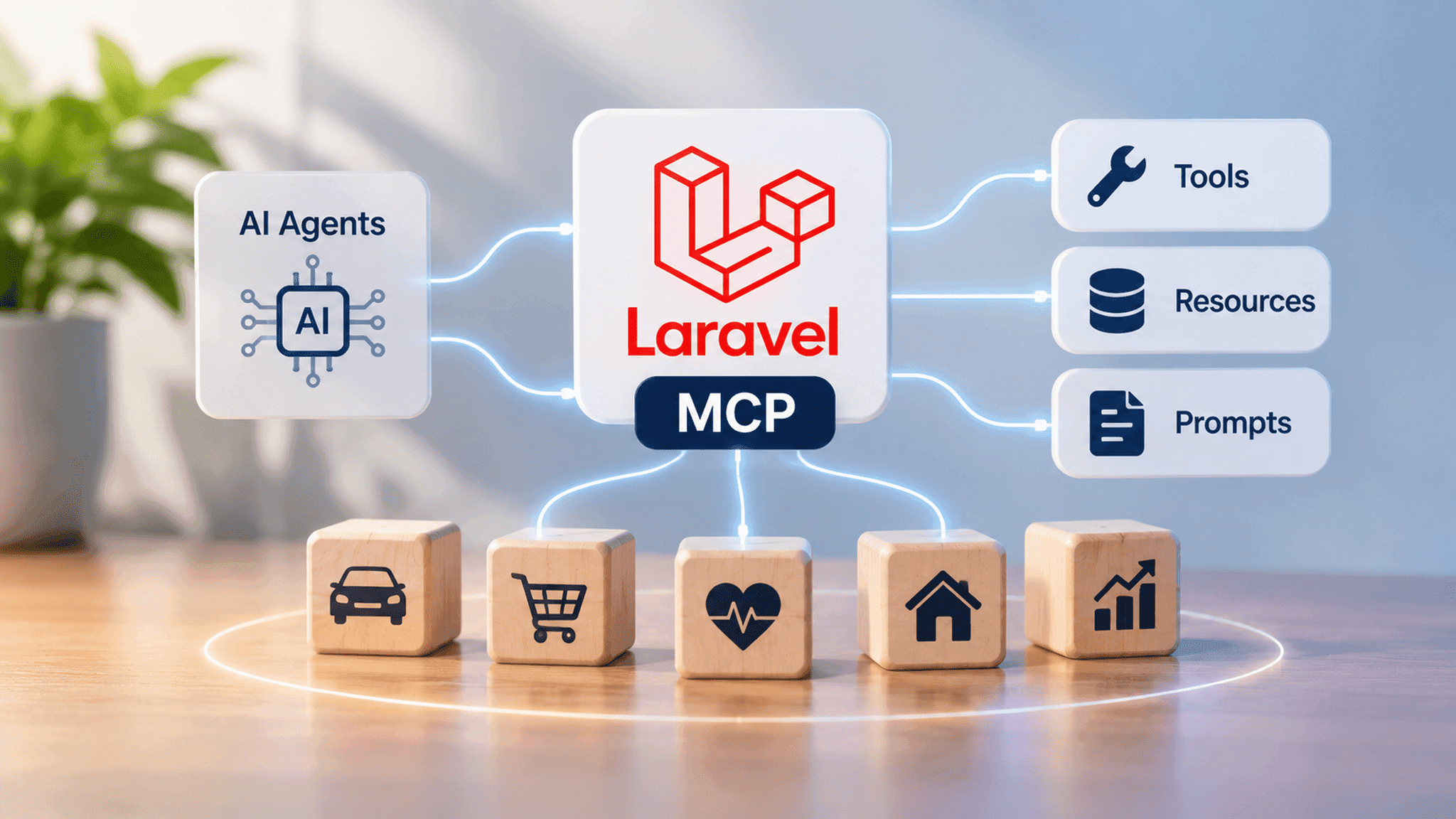
- 2MCP servers expose tools, resources and prompts.
- 3Businesses can explore AI-powered workflows across fleet management, CRM, SaaS and other industries.
- 4Laravel MCP can work alongside existing APIs.
- 5Authentication, authorisation and data protection are essential for secure integrations.
Laravel MCP: A Guide to MCP Servers, Integration and Business Applications
Imagine a fleet manager asking an AI assistant to identify vehicles due for maintenance, review overdue service requests and prepare an operational report.
Instead of navigating multiple dashboards and checking records manually, the manager could request this information through a conversational interface.
This is one of the opportunities created by AI agents. However, for an AI assistant to interact with an existing business application, it needs a structured way to access its data and functionality.
This is where the Model Context Protocol (MCP) comes in. For businesses using Laravel-based platforms, Laravel MCP creates opportunities to connect compatible AI clients with existing application features and build more interactive software experiences.
What Is Laravel MCP?
The Model Context Protocol is an open standard that allows AI applications to communicate with external systems, tools and data sources.
Laravel MCP allows developers to build MCP servers within Laravel applications. These servers expose selected application capabilities so compatible AI clients can discover and interact with them.
An MCP architecture generally includes three components:
MCP Host: The AI application where users interact with an assistant.
MCP Client: The component that communicates with an MCP server.
MCP Server: The service that exposes selected application tools and information.
For example, an AI assistant could connect to a Laravel-based fleet management platform to retrieve authorized vehicle information or access maintenance schedules.
How Does a Laravel MCP Server Work?
A Laravel MCP server can expose application capabilities through three main features:
1. Tools: Functions that AI clients can invoke, such as checking vehicle status or creating maintenance requests.
2. Resources: Information that AI clients can access as context, including vehicle records, driver details and maintenance history.
3. Prompts: Reusable templates for common interactions, such as summarizing maintenance activities or preparing operational reports.
MCP capability | Example |
Tools | Create a maintenance request |
Resources | Retrieve vehicle records |
Prompts | Prepare a fleet activity summary |
These capabilities allow developers to make selected Laravel application functions available to AI clients without exposing the entire system.
Laravel MCP Example: AI-Powered Fleet Management
Consider a company managing hundreds of vehicles through a Laravel-based fleet management platform.
The fleet manager wants to identify vehicles approaching their maintenance dates and review outstanding service requirements.
They ask an AI assistant:
"Show me all vehicles due for maintenance this month, identify overdue service requests and prepare a summary of the vehicles that need attention."
Here's how the integration could work:
1. Request interpretation: The AI assistant understands the request and identifies the required information.
2. Tool discovery: The MCP client discovers the relevant tools exposed by the Laravel MCP server.
3. Data retrieval: Laravel processes the requests and retrieves authorized vehicle and maintenance information.
4. AI analysis: The AI agent organizes the returned information and identifies relevant findings.
5. Report generation: The assistant presents a summary for the manager to review.
If the manager wants to create maintenance requests, a separate tool could support that action, subject to appropriate permissions and confirmation.
MCP provides the communication layer, Laravel manages application logic and data access, and the AI agent coordinates the interaction. This allows businesses to explore AI-powered workflows without replacing their existing software.
Business Applications of Laravel MCP
Fleet management is just one example. Depending on the application and the capabilities developers expose, Laravel MCP can support different business workflows.
Industry | Potential application |
Fleet management | Review vehicle records and maintenance schedules |
CRM | Summaries customer interactions and retrieve sales records |
SaaS | Access account information and generate usage reports |
Real estate | Search property listings and retrieve property details |
Healthcare | Retrieve authorized patient information and appointment details |
These applications demonstrate how AI agents can make business information easier to access and help teams interact with existing software through natural language.
Laravel MCP vs Traditional API Integration
APIs already allow software applications to exchange information and perform operations. MCP does not replace traditional APIs. Instead, it provides a standardized way for compatible AI clients to discover and interact with application capabilities.
Traditional APIs | MCP integration |
Connect applications through defined endpoints | Connect AI clients with exposed capabilities |
Use request and response formats | Use tools, resources and prompts |
Support general software communication | Support AI-driven interactions |
Security Considerations for MCP Server Development
Making application functions accessible to AI clients requires careful security planning. Important considerations include:
Authentication: Verify clients connecting to the MCP server.
Authorization: Restrict access according to user roles and permissions.
Input validation: Validate requests before executing application functions.
Data protection: Avoid exposing unnecessary or confidential information.
Monitoring: Maintain logs to track requests and identify unusual activity.
Developers should also require appropriate confirmation before consequential actions. MCP itself does not automatically secure an application; security depends on how the integration is designed and implemented.
When Should Businesses Consider Laravel MCP?
Laravel MCP may be worth exploring when a business already operates a Laravel application and wants AI assistants to access selected business information or interact with existing application functionality.
However, not every AI feature requires MCP. A simple chatbot answering questions from a fixed knowledge base may not need an MCP server. The decision depends on whether an AI client needs structured access to application tools and data.
Conclusion
AI agents are creating new ways for people to interact with business software. Laravel MCP provides a standardized approach for connecting compatible AI clients with selected application capabilities.
For businesses, this creates opportunities to improve information access, support operational workflows and introduce new AI-powered software experiences.
At Vivansh Infotech, we work on custom software development and AI-powered applications that address practical business requirements. Whether you're exploring MCP server development, AI agent integration or extending an existing Laravel platform, the right development approach can help turn these opportunities into practical business solutions.
Frequently Asked Questions
What is Laravel MCP?
Laravel MCP is a package that helps developers build Model Context Protocol servers within Laravel applications, making selected application features accessible to compatible AI clients.
What is an MCP server?
An MCP server exposes selected tools, resources and prompts so compatible AI clients can interact with external applications and data sources.
What is the difference between MCP and APIs?
APIs allow software systems to exchange data and perform operations. MCP provides a standardised way for AI clients to discover and interact with application capabilities. Both can work together.
Can Laravel MCP work with existing applications?
Yes. Developers can integrate an MCP server into an existing Laravel application and expose selected functionality without rebuilding the entire platform.
Is Laravel MCP secure?
It can be implemented securely with authentication, authorization, input validation, access restrictions and monitoring. Security depends on the implementation.